Password & Authentication
Company Security Recommendations
Summary
-
Password Length: Minimum 8 characters required for all personal and system passwords.
-
Password Expiry: Personal passwords must expire every 90 days.
-
Password Strength: Encourage mixing uppercase, lowercase, numbers, and symbols; avoid dictionary words or predictable patterns.
-
No Shared Passwords: Shared credentials are discouraged. Whenever possible, every user must have their own account with restricted permissions.
-
Individual Access: Apply the least privilege principle. Review each user's access monthly and remove unnecessary permissions.
-
Passbolt Adoption: Encourage all teams to use fvgpassbolt.com for secure password sharing and storage. (Not mandatory yet, but strongly recommended.)
-
No Public Posting of Secrets: Never post SSH keys, passwords, or API tokens in Teams public channels, emails, Jira tickets, or chat threads.
-
Encrypted Sharing Only: If a username/password must be shared, send it only through encrypted channels (Passbolt share link, encrypted message, or similar). No plaintext messages.
-
MFA Everywhere: Enable multi-factor authentication on all services that support it, especially email, cloud dashboards, banking, and infrastructure.
-
SSH Policies:
-
Prefer SSH keys over password logins.
-
Rotate SSH keys every 6 months.
-
Restrict SSH access to known IPs when possible.
-
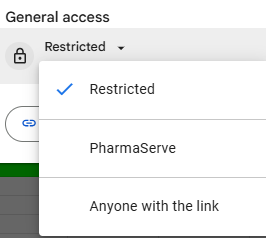
- Google Suite tools & GIT (Docs, sheets, drive forms, GIT repos etc): No sharing of links with any unauthorized person, Always use Restricted. never use 'Anyone with the link'. Share only with employees who need it for their job
Detailed Specification
Password Requirements
All passwords used for company services must contain at least 8 characters.
A strong password should mix uppercase letters, lowercase letters, numbers, and symbols.
Examples of acceptable passwords:
-
Moonlight!42 -
Giraffe_2024 -
tR9@windpath
Examples of unacceptable passwords:
-
12345678 -
password -
CompanyName2023(too predictable)
Passwords must also be changed every 90 days. The system will prompt you when it is time to update.
Avoid Shared Accounts
Each person should have their own account whenever a system supports individual user access.
This makes it easier to track activity and remove access when someone leaves the team.
Example:
Instead of everyone logging into the server using a common admin account, each person should use their own user account such as paddy, alex, or sam.admin.
If a tool absolutely requires a shared login, store that credential securely (see Passbolt section below).
Use the Least Privilege Approach
Employees should only have the access necessary for their job.
Example:
If someone moves from development to marketing, access to staging servers should be removed even if there are no immediate issues.
Passbolt Usage
We encourage all teams to use https://fvgpassbolt.com to store and share passwords securely.
It supports encrypted sharing and keeps an audit trail of who has access.
Example:
If you need to share the login for a third-party vendor dashboard, share it through Passbolt instead of sending it over Teams.
Never Post Secrets in Public Channels
SSH keys, passwords, and API keys must not be posted in Teams public channels, Jira tickets, email threads, or unencrypted chats.
Correct Example:
-
Sharing an encrypted Passbolt link for the password.
- Only send encrypted passwords in personal inboxes
-
Sending a message like: “I’ve shared the database password with you in Passbolt.”
Incorrect Example:
-
Posting the password in a Teams channel:
“DB Password is:Root@123”
Even if the channel feels “internal,” treat it as a public space — logs are permanent, searchable, and visible to many.
Encrypted Sharing Only
Not allowed:
Sending the password in a Teams DM in plain text.
Multi-Factor Authentication
Whenever a service supports MFA, it must be enabled.
This includes:
-
Email
-
Cloud dashboards
-
Banking accounts
-
Server control panels
-
Git repositories where applicable
SSH Security Practices
SSH access is one of the most sensitive parts of our infrastructure, and we treat it carefully.
-
Use SSH keys, not password logins.
-
Rotate your SSH keys every 6 months.
-
Limit SSH access to known IP addresses when possible.
Google Suite tools & GIT(Docs, sheets, drive forms etc)
- No sharing of links with any unauthorized person
- Always use Restricted. never use 'Anyone with the link'. Share only with employees who need it for their job